
IT technicians are the people who make sure systems stay up and everyone else can actually do their jobs. You don't need a four-year degree to get into this career, and the demand for good IT support is still outrunning supply. According to the Xpatweb Critical Skills Survey, ICT specialists remain among the most critically short-skilled occupations in the country, with the shortage getting worse, not better.
That gap is your opportunity.
This guide covers everything you need to know about becoming an IT technician in South Africa in 2026: from the certifications that actually matter, to what the job pays and where you can go from there.
What Does an IT Technician Do?
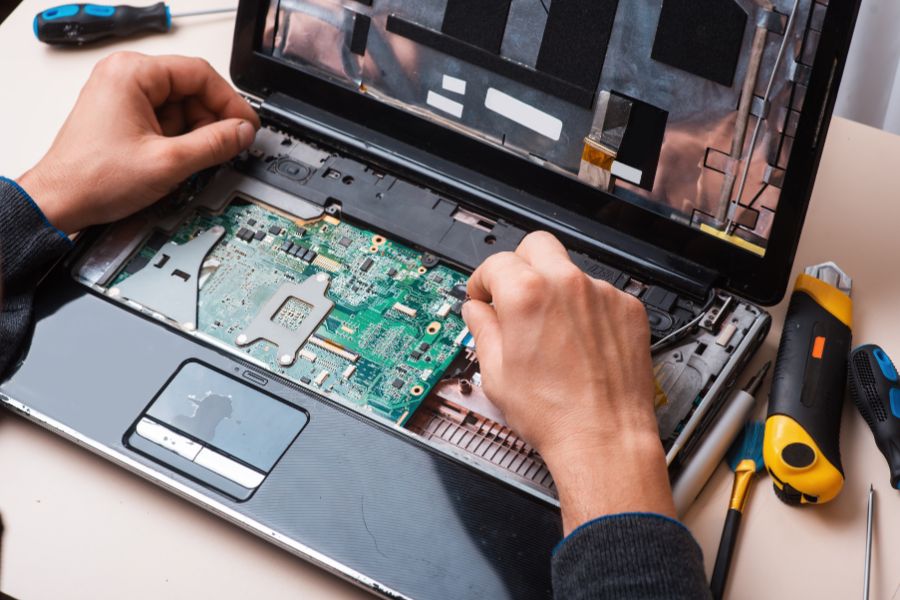
The job title covers more ground than most people expect. On any given day, an IT technician might be setting up new computers for a company, tracking down why the office network keeps dropping, helping a user whose laptop won't boot, updating software across a fleet of devices, or patching a security vulnerability before it becomes a real problem.
Some IT technicians are desk-based, taking support calls and resolving issues remotely. Others are on the move, going on-site to fix problems in person. Most end up doing a bit of both.
The role goes by different names depending on the employer. At its core though, the job is simple: keep things running, and fix them when they break.
Do You Need a Degree?
No. IT is one of the few technical careers in South Africa where a degree is genuinely optional, not just technically optional but practically irrelevant in practice. There's no regulatory body controlling who can call themselves an IT technician, and most employers are far more interested in what you can do than what's on your certificate.
The clearest entry path for most people is through industry certifications, specifically CompTIA A+, which is the global standard for entry-level IT technicians. Plenty of working IT technicians in South Africa have built solid careers through certifications alone, without a degree in sight.
A formal qualification (a diploma, higher certificate or degree) does make your CV stronger, especially for larger organisations or more senior roles. But if you want to get into IT quickly, certifications are where you start.
What Do You Need to Get Started?
For most certification programmes and short courses, a matric certificate is enough. Some routes are accessible even earlier. The NCV Information Technology and Computer Science programme at TVET colleges, for example, starts from Grade 9.
Maths helps. It's not always a hard requirement, but IT work is logical and methodical, and if you struggled with Maths at school it's worth knowing that upfront. IT or CAT (Computer Applications Technology) as a school subject is useful background, though most courses don't require it.
How to Qualify: Your Options
Start With CompTIA A+
CompTIA A+ is the certification that opens the door to most IT technician roles. It covers the fundamentals: hardware, software, operating systems, troubleshooting and basic networking. To earn it, you need to pass two exams: Core 1 (220-1201) and Core 2 (220-1202). Each exam voucher costs $253 USD at the standard rate, so you're budgeting for two. Exams are taken at authorised Pearson VUE testing centres across South Africa. Local pricing can be lower than the US rate, so check on CompTIA's South Africa site before you buy a voucher.
Once you've got your A+, CompTIA Network+ is the logical next step. It goes deeper into networking: how routers and switches work, network protocols, troubleshooting connectivity problems. This is what separates general IT support from network-focused roles, which tend to pay more.
For anyone wanting to work in cloud-based environments, Microsoft Certified: Azure Fundamentals is worth adding to your list. Cloud is where a lot of South African IT infrastructure is heading, and even in support roles, employers are starting to expect at least a working familiarity with it.
Short Courses to Get You Exam-Ready
If you'd rather have structured preparation before attempting the CompTIA exams, there are good options available.
Boston City Campus offers a six-month Computer Technician Short Course that's built around the CompTIA A+ syllabus. It covers Windows, A+ content and customer service, runs in distance mode with support at learner centres nationwide, and has open entry requirements, meaning you can enrol without specific matric results. On completion, you'll have the Boston certificate and you can choose to sit for the actual CompTIA A+ exams separately.
CTU Training Solutions is an authorised CompTIA training partner with programmes covering A+, Network+ and cybersecurity fundamentals.
Diplomas and Higher Certificates
If you want something more formal than a short course but don't want a full three-year degree, diplomas and higher certificates in IT are worth looking at. Boston City Campus offers a Diploma in Network Systems and a Higher Certificate in Network Systems Practice, both sitting at NQF Level 5. These carry more weight with larger employers and give your CV a recognised qualification alongside your certifications.
TVET colleges offer NCV IT programmes from NQF Level 2 through to Level 4, and they're NSFAS-funded for eligible students, making them one of the most accessible formal routes into IT for anyone from a lower-income household.
Degrees
A BSc in Computer Science or a Diploma in IT from a public university is the right move if you're planning to go beyond IT support: systems administration, cybersecurity, software development or network engineering. UCT, Wits, UP, UNISA and TUT all offer relevant programmes. UNISA is worth flagging specifically if you need to keep working while you study. Their distance-learning model is built for exactly that.
Use FundiConnect's APS Score Calculator to check whether your marks qualify you, and our 2027 university application dates guide to track closing dates.
The Step-by-Step Path
Step 1: Get Comfortable With the Basics
If you're still at school, take IT or CAT if it's offered, and don't underestimate Maths. If you've already finished school and haven't touched a computer beyond social media, spend a few weeks on YouTube or freeCodeCamp just getting comfortable with how computers actually work before you start a formal course. You'll absorb everything faster.
Step 2: Earn Your CompTIA A+
This is the most important step for most people breaking into IT. Study for and pass both A+ exams. Whether you go through Boston City Campus, CTU or self-study using CompTIA's own resources, the goal is the same: pass Core 1 and Core 2 and get that credential behind your name.
Step 3: Get Your Hands Dirty
A certification tells employers you know the theory. Experience tells them you can actually do the job. While you're studying, volunteer to fix computers for people you know. Help out at a local school or community organisation. Build a small home lab using second-hand hardware. The more real troubleshooting you can get under your belt before your first interview, the better. Check FundiConnect's learnerships guide for formal learnership opportunities in IT.
Step 4: Add Network+ Once You're Working
Your first IT role won't be glamorous. Desktop support, password resets, printer problems. That's the reality of entry-level IT. But once you're in, start working towards CompTIA Network+. It shifts you from generalist support into networking, which opens up better-paying roles. From there, cybersecurity, cloud and systems administration are all realistic next steps depending on where your interests take you.
Step 5: Keep Your Certifications Alive
CompTIA certifications expire after three years. You renew through continuing education or a renewal exam. In a field that changes as fast as IT, this isn't a bureaucratic annoyance. It's how you stay relevant.
What You Actually Need to Be Good at This Job
The technical skills are learnable. What tends to separate the IT technicians who get promoted from those who stay stuck at help desk level is less about what they know and more about how they work.
Being good at troubleshooting means being comfortable not knowing the answer immediately and working through a problem methodically until you find it. A lot of people find that frustrating. The ones who find it satisfying tend to do very well in IT.
How you talk to non-technical people matters more than most job descriptions admit. When someone's laptop dies an hour before a big presentation, they're stressed and they need help fast. If you can stay calm, explain clearly what's happening and fix it without making them feel stupid, you'll be remembered as someone who's genuinely good at their job.
And the willingness to keep learning is what turns a two-year career into a twenty-year one. The tools change. The threats change. The people who stay curious are the ones who stay employable.
What IT Technicians Earn in South Africa (2026)
Career Stage | Estimated Annual Salary |
|---|---|
Entry-level IT Technician | R144,540 to R216,000 |
Mid-level IT Support Specialist | R248,000 to R350,000 |
Senior Technician / Systems Administrator | R350,000 to R500,000+ |
Specialist (cybersecurity, cloud, network) | R500,000 to R750,000+ |
Sources: PayScale South Africa, ERI SalaryExpert, Indeed South Africa
Indeed South Africa puts the average IT support salary at R16,215 per month based on 251 reported salaries as of July 2026, with entry-level IT technician salaries starting around R12,045 per month from their June 2026 data. Johannesburg and Cape Town tend to sit above the national average. Specialists in cybersecurity and cloud typically earn significantly more than general support technicians.
Where an IT Technician Career Can Take You
Most people who start in IT support don't stay there forever, and that's not a bad thing. It's how the industry works. The entry-level roles exist precisely because they're how you build the foundational skills that open up everything else.
Network administrators manage an organisation's full network infrastructure and are usually the next step for technicians who go on to do CompTIA Network+ and CCNA. Cybersecurity analysts protect systems from attack, and it's one of the fastest-growing and best-paid specialisations in South Africa right now. Systems administrators run the servers, user accounts and overall IT infrastructure for a business, often across both Windows and Linux. Cloud engineers manage cloud-based infrastructure across platforms like AWS, Azure and Google Cloud, an area South African employers can't hire for fast enough. And IT managers lead teams of technicians, which is where the technical track eventually meets leadership.
FAQs
Can I get into IT without matric?
Some short courses, including Boston City Campus's Computer Technician programme, have open entry requirements and don't ask for specific matric results. CompTIA itself has no formal entry requirements for its exams. That said, most formal programmes and most employer applications do ask for matric as a minimum, so it's worth getting it if you don't have it yet.
How quickly can I be job-ready?
If you focus on the CompTIA A+ route, three to six months of solid study is realistic. Boston's Computer Technician course runs for six months. A diploma is typically two years and a degree three to four.
Is the CompTIA A+ actually recognised in South Africa?
Yes. It's taken at Pearson VUE test centres across the country (Johannesburg, Cape Town, Durban and Pretoria among others) and it's the benchmark qualification that South African IT employers look for at entry level.
What's the difference between IT support and software development?
IT support keeps existing systems running. Software development builds new ones. They're both tech careers, but they attract different types of people and require different skills. If you think you might be more interested in building things than fixing them, take a look at FundiConnect's software engineer guide.
Can I study for this while working full-time?
Yes, easily. CompTIA certifications are self-paced, so you study when you can and book your exam when you're ready. UNISA's IT programmes are designed for exactly this kind of learner. It takes longer, but it absolutely works.
Ready to Fund Your IT Journey?
Getting certified costs money. So does a laptop capable of running what you need to practise on. Fundi has been helping South African students fund their education since 1996, and that includes IT courses, diplomas and the equipment you need to study. You can apply for a Fundi study loan to cover course fees and other study costs. Before you apply, use the Fundi loan calculator to see what your monthly repayments would look like. And if you need a laptop, the Fundi Shop lets you finance a device separately.
Applying takes a few minutes. Visit loans.fundi.co.za, fill in the form, and someone will get back to you.
For more on IT careers, courses and how to fund your studies, visit www.fundiconnect.co.za.
You can also follow FundiConnect on Facebook, X, Instagram and LinkedIn.

The FundiConnect Editorial Team researches, writes, and maintains comprehensive guides on South African higher education, bursaries, NSFAS funding, and career development. Our content is verified against official institutional sources, DHET publications, and direct admissions office communications to ensure accuracy for students navigating their post-school journey.
Prefer FundiConnect on Google
Add us as a preferred source and see more of our guides in your Search results.

Learnerships 2027: Complete Guide to Available Programmes in South Africa
South Africa offers hundreds of learnership programmes every year — but knowing where to look and when to apply makes all the difference. Here's a complete guide to the best learnerships available for 2027, from government and SOEs to banking, IT and engineering.

Bachelor of Science Degree: What Jobs Can You Get?
A BSc can lead almost anywhere, but where it leads depends entirely on what you studied. Here's a practical breakdown of every major BSc stream, the jobs that come with each one, and what you can realistically expect to earn in South Africa in 2026.

Courses High in Demand in South Africa
South Africa has a well-documented skills shortage, and that's good news if you're choosing what to study. Here are the 10 courses most in demand in 2026, backed by real labour market data, with a breakdown of what to study and where.